End to End HTTPS request flow:
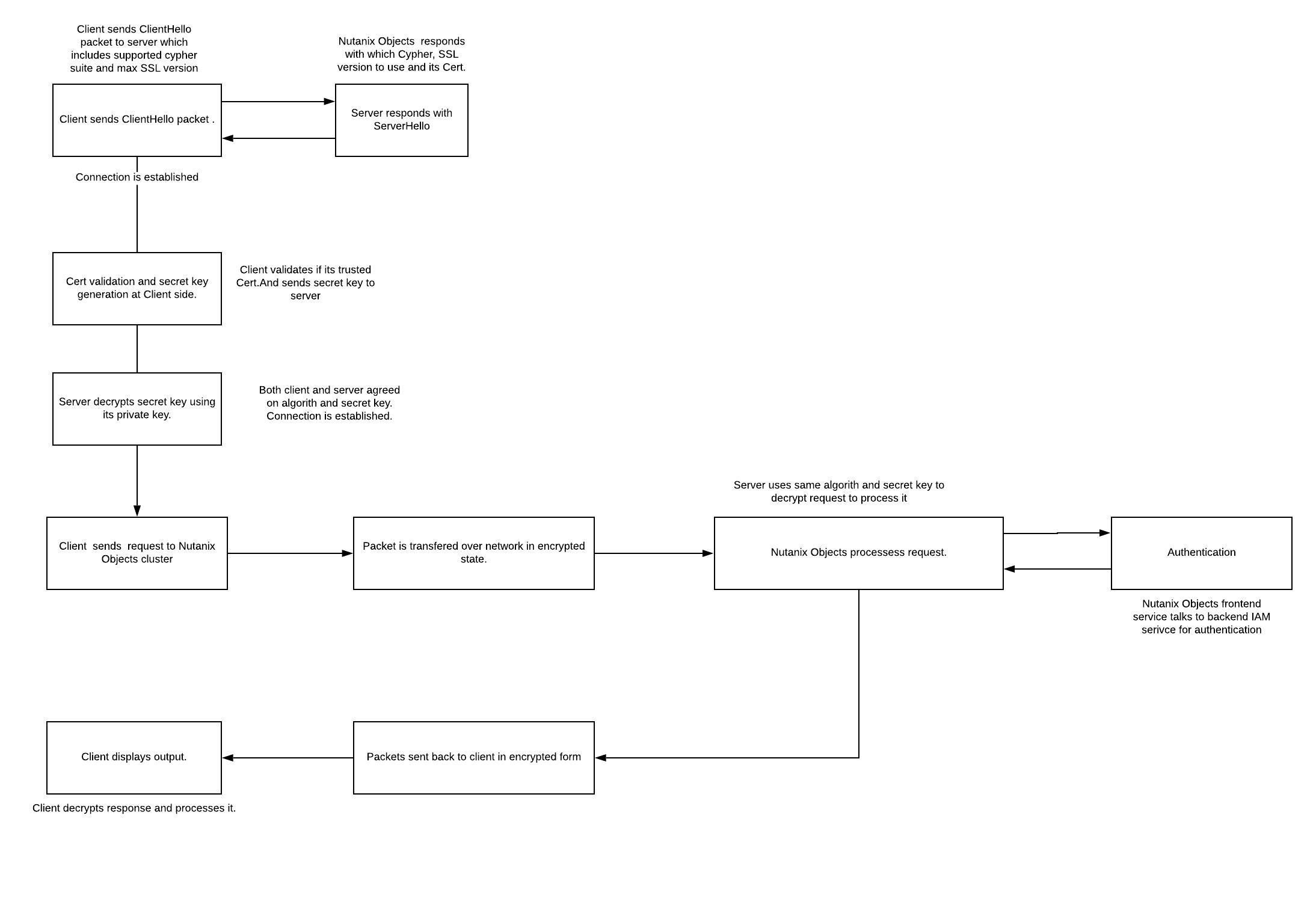
- Initial Handshake :
- Client sends ClientHello message to server along with all available Cipher suite and max supported SSL version.
- Server responds to the request with ServerHello message which contains decision on which Cipher to use based on client preference, SSL version and its Cert which has public key.
- Contact is established.
- Client checks if server cert is part of its trusted list of CA’s. If yes then client uses the server's public key and agreed algorithm to generate random secret key and sends it to server.
- Server decrypts secret key using its private key.
- Both client and server are now agreed to use the common algorithm and specific key to encrypt and decrypt the communication.
- Connection is established
- Client forms plain text HTTP request, encrypts it using agreed algorithm and secret key. It sends the request to Nutanix Objects server.
- Server uses the same algorithm and secret keys to decrypt the request and serve the response in the same encrypted form.
- Client receives the response , decrypts it by using the same algorithm and secret key.
- Result is displayed to application.
Here you can see client relies on Server certs and public key. But Server never asks for client certs which is called TLS. If server also rely on client cert & public key to check clients authenticity, then its called mutual TLS.
Nutanix Objects doesn’t support mutual TLS.
Self Signed Certificates :
Why am I seeing Certificate warning while accessing S3 endpoint :
-
Nutanix Objects generates self sign certificate during deployment and is passed down the stack.
-
Whenever client tries to connect S3 endpoint over https, Nutanix Objects presents its self signed certs to client.
- These certificates are generated using private key and signed by Nutanix Objects itself (i.e signed by self, and thats why its called self signed certs).
- When client gets the response, it tries to find CA certs presented by Nutanix Objects in its trusted CA’s list.
- Obviously, client will not find any information about the CA. And it will then throw warning to user whether to trust server or not since its not able to validate server authenticity.
- You should see similar dialog box :
- Its safe to click Continue and proceed to access Nutanix Objects cluster.

Can I re-generate self sign certs:
- Yes. You may want to re-generate certs when
- Your existing CA certs & private keys are compromised. In this case, a hacker can impersonate itself as Nutanix Objects and can hack all your data. So it's good to re-generate it.
- Select the first option from the above screen and hit replace. It will take a couple of mins for service to come back with new certs.

Your Comments